
Atom properties
Select an atom and open Properties. It shows the Label, Charge, Isotope and Hydrogens, the Query atom settings for substructure searches, and Shape at this atom with the steric number, AXE class, geometry, hybridization and ideal angle.
Select one atom with Select (V), or move to it with Alt+. and press Enter. Properties shows that atom.
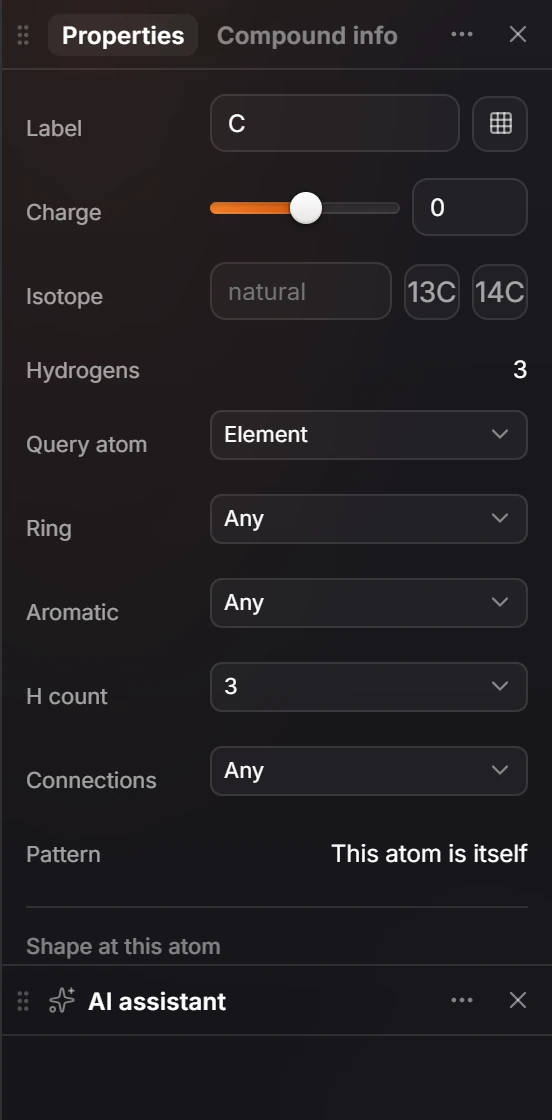
The atom
| Setting | Does |
|---|---|
| Label | The element or label |
| Charge | The formal charge |
| Isotope | The mass number, blank for the natural element. See isotopes |
| Hydrogens | The implicit hydrogen count |
Query atom
For finding a structure as a substructure, an atom can match more than itself:
| Setting | Matches |
|---|---|
| Query atom | Element, or a broader choice |
| Ring | In a ring, not in one, or Any |
| Aromatic | Aromatic, not, or Any |
| H count | A number of hydrogens, or any |
| Connections | A number of neighbors, or Any |
Pattern says in words what the atom will match, for example "This atom is itself".
Shape at this atom
Athanor works out the VSEPR shape at the atom:
- Steric number, for example 4 (4 bonds + 0 lone pairs);
- AXE class, such as AX4E0;
- Electron geometry and Molecular geometry, such as tetrahedral;
- Hybridization, such as sp3, and the Ideal angle, such as 109.5°.
Show orbitals draws the atom's orbitals. See visualize orbitals.
Is this helpful?
Last updated Nov 12, 2026
- Still stuck? Read the FAQ or contact support.
- Something wrong on this page? Tell us.
- For AI tools: llms.txt