
How to show R and S, E and Z labels
Turn on View › Show stereochemistry. Each stereocenter gets R or S and each stereo double bond E or Z, worked out from the CIP priority rules and updated as you draw.
Steps
- Draw or insert the structure, for example menthol (press / and type
menthol). - Choose View › Show stereochemistry in the Main menu.
- Every stereocenter shows (R) or (S), and every double bond with a defined geometry shows (E) or (Z).
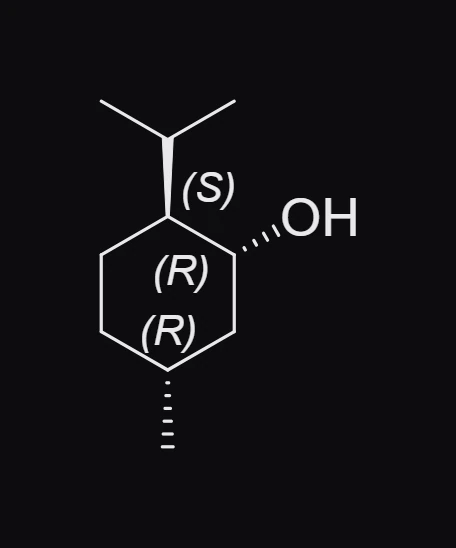
The labels follow the CIP rules (Cahn, Ingold and Prelog), which rank the groups on each center. Change a wedge to a hash and the label flips at once. See How to draw wedge and hash bonds.
For one structure only
Select the structure. In the Properties panel, under Display, set R/S labels to On.
Note
A stereocenter drawn without a wedge or hash has no label, and the issues badge counts a warning such as "C's configuration is not drawn".
Is this helpful?
Last updated Nov 12, 2026
- Still stuck? Read the FAQ or contact support.
- Something wrong on this page? Tell us.
- For AI tools: llms.txt