
The Formula finder plugin
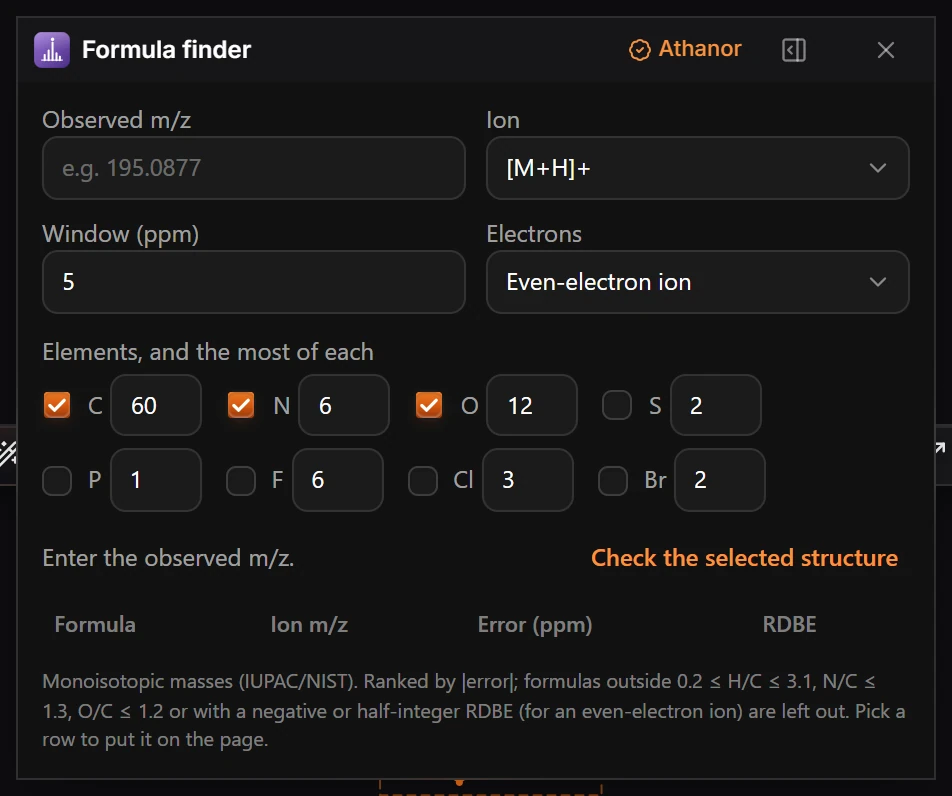
Choose Plugins › Formula finder: Open Formula finder, enter the observed m/z, the ion and the ppm window, choose the elements, and it lists the formulas that match.
Steps
- Choose Plugins › Formula finder: Open Formula finder.
- Type the Observed m/z, for example
195.0877. - Choose the Ion (such as [M+H]+), the Window (ppm) (5 to start) and Electrons (Even-electron ion for most ESI ions).
- Under Elements, and the most of each, tick the elements to allow and set the most of each. C, N and O are ticked to start.
- The table lists each Formula with its Ion m/z, Error (ppm) and RDBE, smallest error first. Pick a row to put it on the page.
- Or press Check the selected structure to compare the formula of what you drew with the m/z.
The masses are monoisotopic (IUPAC and NIST). Formulas outside 0.2 ≤ H/C ≤ 3.1, N/C ≤ 1.3 and O/C ≤ 1.2 are left out, as is a negative or half-integer RDBE for an even-electron ion.
Is this helpful?
Last updated Nov 12, 2026
- Still stuck? Read the FAQ or contact support.
- Something wrong on this page? Tell us.
- For AI tools: llms.txt