
How to export a figure for a journal paper
Pick the journal's style in Document type, then export as PDF, SVG or EPS (vector, sharp at any size) or as PNG or TIFF at the resolution the journal asks for, such as 600 dpi.
Steps
Click an empty part of the canvas and, in the Properties panel, set Document type to the journal's style, for example ACS Document 1996 or RSC (1 Column) Document. Bond length, line widths and fonts follow the journal's rules. See How to use your ChemDraw style sheets.
Select the figure, or nothing for the whole page, and press Ctrl+Shift+E.
Pick the format the journal wants:
- Vector (stays sharp at any size): PDF, SVG, EPS or EMF.
- Bitmap: TIFF or PNG, at the resolution the journal asks for.
For a bitmap, set Resolution, and set Background to White unless the journal accepts transparency.
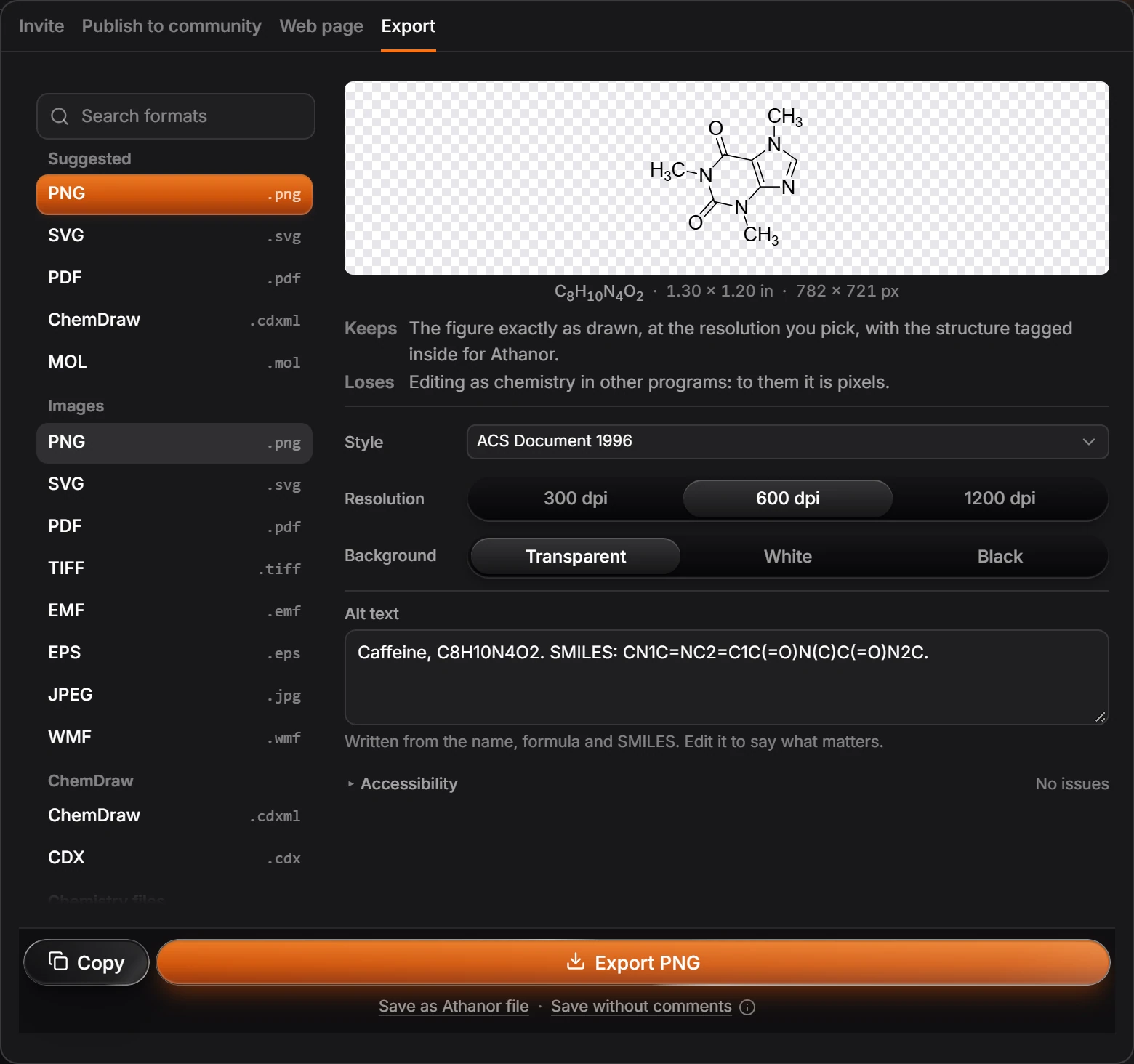
Press Export.
Tip
Check the journal's author guidelines for the resolution and the figure width it wants. Journal styles with one-column and two-column versions, such as RSC (1 Column) and RSC (2 Column), are listed separately in Document type.
Is this helpful?
Last updated Nov 12, 2026
- Still stuck? Read the FAQ or contact support.
- Something wrong on this page? Tell us.
- For AI tools: llms.txt