
How to label a structure with its chemical shifts
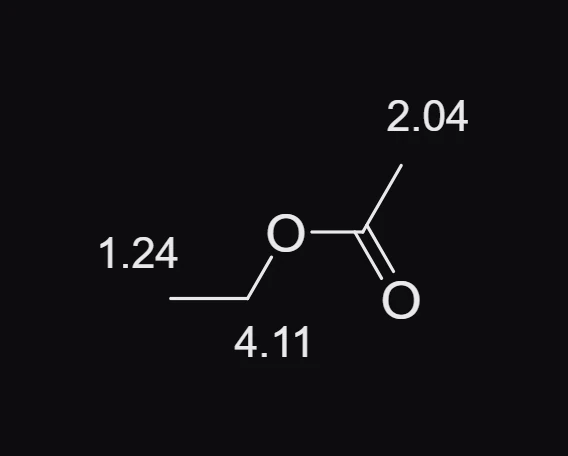
In the Predicted NMR window, press Show shifts on the structure. Each predicted shift is written beside its atom as a label on the page. One Ctrl+Z removes them all.
Steps
- Open the prediction for the structure: Object › Chemistry › Predict 1H NMR (or 13C).
- Press Show shifts on the structure. A message says how many atoms were labeled, for example "Labeled 3 atoms with predicted shifts. Undo removes them all."
- Close the window to see the drawing. Each label is ordinary text, so you can move it with Select (V) where it sits too close to another.
To take them away, press Ctrl+Z once.
Is this helpful?
Last updated Nov 12, 2026
- Still stuck? Read the FAQ or contact support.
- Something wrong on this page? Tell us.
- For AI tools: llms.txt